Set up Everpace with your Garmin
The phone app, Garmin Connect and the watch app, then your first plan. About five minutes.
No watch yet? Tap Skip for now and add it later from More › Devices › Run setup again.
Setup questions →Get the phone app
Install Everpace on your phone: Google Play (Android 8.0 or later). The iPhone app (iOS 18 or later) is coming soon.
 iPhoneComing soon
Pair your watch in Garmin Connect
Install Garmin Connect on the same phone, sign in, and pair your watch there. Pairing in Bluetooth settings alone is not enough.
Add Everpace to your Garmin
Free in the Connect IQ Store, every format, no limit on what you send.
Open it on the watch once
Find Everpace in the watch's app list and open it. Once is enough.
Connect your watch
Open Everpace on your phone and pick Garmin as the watch you train with. Connect your watch checks three things: Garmin Connect is installed, a watch is paired, Everpace is on the watch.
Anything missing has a button to fix it; then tap Check again.
Send today's workout
On Today, tap Create today's training, paste the workout, tap Read it, then Looks right, then Save and send to watch.
Start the first set
On the watch, open Everpace and tap Start. Every set shows the load to lift and what you did last time.
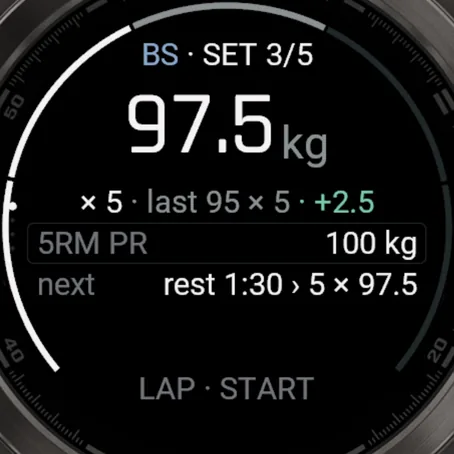
The first set on your wrist
Common questions
Not here? Write to us.
Watch setup
The setup can't find my watch
Everpace reaches the watch through Garmin Connect. Check these in order: Garmin Connect is installed and signed in on this phone. The watch is paired in Garmin Connect, not just in Bluetooth settings. Everpace is on the watch, from the Connect IQ Store. You've opened Everpace on the watch at least once. Then go to More › Devices › Run setup again. Still stuck? Write to us.
Devices says Garmin Connect isn't running
Open Garmin Connect once, wait until it shows your watch, then come back to Everpace.
I can't find Everpace in the Connect IQ Store
Use the Connect IQ Store button on this page, or search "Everpace" in the Connect IQ Store app on your phone. If it doesn't show for your watch, your model isn't supported yet. Check the list on the Garmin page and tell us which one you have.
Apple Watch or Wear OS?
Not yet. Today the watch app runs on Garmin. Without a watch, log on the phone: records and history work the same.
Workouts and sync
My workout came back with a line unread
On Check the read, lines Everpace couldn't place stay under Not understood, so nothing is lost. Tap Add as movement or Make a block to place a line, or tap Edit to change the plan. If your gym writes something a certain way, send us the text. New formats reach the reader in app updates.
My session is still on the watch
The watch keeps every session until your phone confirms it has it, so nothing is lost. Open Everpace with the watch nearby and Garmin Connect running, then pull down on Today or tap More › Devices › Sync now. On Android, Everpace also checks every 15 minutes while a watch is paired. On iPhone, the session arrives when you open the app.
Kilograms or pounds?
Either. Set it in More › Weight unit. The phone and the watch show loads in your unit (the watch from the next plan you send), and loads your coach writes in the other unit are converted.
Which languages?
English, German, Spanish, French, Italian, Polish, Portuguese (Brazil) and Ukrainian. Workout text and movement names stay in English.
Pro and billing
Is the watch app free?
Yes. The Garmin watch app is free in the Connect IQ Store, every format, with no limit on what you send. Pro is a phone-app subscription; the watch app has no Pro.
Restore Pro on a new phone
Open More › Everpace Pro and tap Restore, with the same Apple Account or Google account you bought with. Pro bought on Google Play doesn't carry over to an iPhone, or the other way round; there's no Everpace account to link them. Prices, trial and cancelling are on the Pro page.
Phones and data
Moving to a new phone
Your workouts live on your phone and in its own backup: Google backup on Android, iCloud backup on iPhone. Restore that backup on the new phone and they come with it. Moving between Android and iPhone isn't supported yet.
Where is my data?
On your phone and in its own backup, not on our servers, and there is no account to make. Workouts you run on the watch are also saved to your Garmin Connect account. No advertising ID, nothing used for ads. Anonymous usage statistics and crash reports can be switched off in More; in the EU, EEA, UK and Switzerland the app asks first.
How do I delete my data?
Delete one workout from its screen with Delete workout. To delete everything, uninstall Everpace or clear its storage. Copies in your phone's backup follow your backup settings, and workouts saved to Garmin Connect are kept by Garmin. The delete your data page covers crash reports, usage statistics and purchase records.
Every email reaches the developer.
Everpace is built by Mykhailo Nester, an independent developer. Ideas, bugs and workouts it can't read all go to the same inbox, and every one is read.
Opens your mail app · hello@geteverpace.com